AI Music Video Generator
AI Music Video Generator
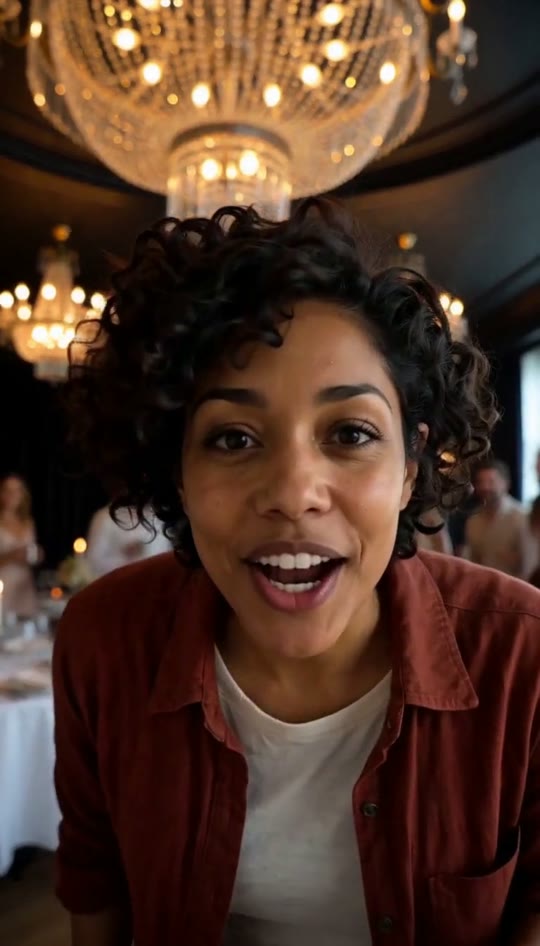
Turn one photo into a 15-second vertical clip where you star in a party scene. The AI keeps your face and clothes while you walk in and raise a silver cup.
How it works
How to use the AI music video generator
Every video is generated by an AI video model from your photo and a written description of the party: you keep your face, hairstyle and the clothes from the photo, while the chandelier room, the friends and every beat are set. No footage, artist or song from the music video is used.
- 01
Upload your photo
Start by selecting one JPG, PNG, or WebP photo up to 10 MB showing a clear, well-lit face. Choosing your photo and signing in are completely free steps on the site before you commit to making the video.
- 02
Pay with platform credits
Pay 1,250 platform credits, which costs $5, through FloatPass to start the generation process. There is no free video available. If the generation fails to complete, the system automatically gives your credits back to you.
- 03
Get your video
Wait a few minutes for the 15-second vertical 9:16 MP4 to arrive directly in your My videos section. Download the file to your device, add a trending sound, and post it to TikTok, Reels, or Shorts.
$5 per video, a one-time purchase with no subscription. Failed generations return your credits.
What this AI music video generator creates
See exactly what goes into your 15-second vertical MP4 when you upload a single photo to the generator.
One photo makes you the star
You only need one picture of one person to use this ai music video generator. Start by uploading a JPG, PNG, or WebP file that is up to 10 MB in size. Ensure the image has a clear, well-lit face. The lead in the final video keeps the exact face, hairstyle, and clothes from your original photo, putting you directly into the center of the generated party action.
A 15-second choreographed sequence
The generator builds a highly specific 15-second routine for your video based on a written description. The sequence starts with your walk-in from zero to three seconds. Then, you bring a silver cup to the lens from three to six seconds, point at the friends from six to ten seconds, do the hand-over-the-eyes look from ten to thirteen seconds, and hold the cup up high from thirteen to fifteen seconds.
Vertical format for social media
Every clip you create with the tool is a vertical 9:16 MP4 file. This specific format means your file is instantly ready for you to post directly to TikTok, Reels, and Shorts. You do not need to crop or resize the video after it arrives in your My videos section. The vertical framing focuses entirely on you as the main subject standing inside the generated chandelier room.
Generated party room and friends
While you remain the star of the clip, the environment around you is entirely built by the ai music video generator. The background features a chandelier room filled with generated people acting as your friends. No actual footage, artists, or songs from the music video are used in the process. Instead, the room, the background characters, and all of the physical moves are generated from a written description.
Ambient party sounds included
The resulting MP4 file does not include any music. Instead, the video has party ambience only. Throughout the 15-second clip, you will hear chatter, cheering, and clinking glasses that match the visual scene of the chandelier room. Because there is no song attached to the file, you simply add the current trending sound when you post the video to your preferred social media platform.
Clear pricing and credit refunds
Choosing a photo and signing in to the site are completely free actions. However, there is no free video option. Generating each video costs 1,250 platform credits, which equals $5, and payments are processed through FloatPass. If a generation fails for any reason, the system gives your credits back to your account. When successful, your finished video files arrive in a few minutes.
Ways to use an AI music video generator
Post a TikTok trend
Take a clear photo of yourself and run it through the ai music video generator. Because the lead keeps the clothes from the photo, you control your look. You receive a 15-second vertical MP4 ready for TikTok. Add a trending song over the ambient party chatter and share the clip with your followers.
Make a reel with a friend
The site only puts one person in a video and does not animate pets. To feature two friends together, upload a photo of yourself for one video, and a photo of your friend for a second video. Put the two 15-second MP4 files side by side and post them as a Reel.
Create a YouTube Short
Use a well-lit JPG, PNG, or WebP to generate a clip for your YouTube Shorts channel. The 9:16 vertical format fits the platform perfectly. The video shows you walking in, pointing at generated friends in a chandelier room, and holding a silver cup, giving your subscribers a 15-second party scene starring you.
Share in a group chat
Turn a photo of a friend into a party scene to surprise them in your group chat. Because the lead keeps the face, hairstyle, and clothes from the original photo, they will recognize themselves immediately as they do the hand-over-the-eyes look. Download the file from My videos and send the MP4 directly.
Test different outfits
Test different outfits by uploading multiple photos to the ai music video generator. Each video costs 1,250 platform credits, or $5. Since the lead keeps the clothes from the photo, you can generate one video in casual wear and another in formal wear. Compare the 15-second clips in your My videos section.
Your photos
How your photos are handled
Photos are uploaded only after you sign in, and they are used to create the video you request. The privacy policy has the full notice.
Read the privacy policyHow much does the ai music video generator cost?
Choosing your photo and signing in are free, but there is no free video option on the site. Each video you make costs exactly 1,250 platform credits, which equals $5. You pay for these credits securely through FloatPass. If a video generation fails to complete for any reason, the site automatically gives your credits back so you can try again without paying twice.
What kind of photo works best in the ai music video generator?
You only need one photo of one person to start. The file must be a JPG, PNG, or WebP format and cannot be larger than 10 MB. For the absolute best result, the photo should feature a clear, well-lit face. The tool uses this specific image to ensure the lead in the video keeps your exact face, hairstyle, and clothes throughout the 15-second clip.
Does the ai music video generator add a song to the file?
No, the finished 15-second MP4 file does not include any music. The video features party ambience only, which includes background chatter, cheering, and the sound of clinking glasses. No footage, artist, or song from any actual music video is used. You must add the trending sound or song yourself when you upload the video to TikTok, Reels, or Shorts.
How long is the clip from the ai music video generator?
Every video produced by the site is exactly 15 seconds long. The specific sequence includes the walk-in from zero to three seconds, bringing the silver cup to the lens from three to six seconds, pointing at the generated friends from six to ten seconds, the hand-over-the-eyes look from ten to thirteen seconds, and finally holding the cup up high from thirteen to fifteen seconds.
Can I put my dog in the ai music video generator?
No, the site does not animate pets at all. Each video requires exactly one photo of one person. The background characters are generated people, and the main subject is built exclusively from a human face. If you want to include a second person, you must make two separate videos and post them side by side.
Where do I find my file from the ai music video generator?
After you pay your 1,250 platform credits through FloatPass, the video arrives in just a few minutes. You will find the finished 15-second vertical 9:16 MP4 stored securely in the My videos section of the site. From there, you can download the file directly to your device so it is ready to post on your social media accounts.
Does the ai music video generator use real footage?
No footage, artist, or song from the original music video is used in your file. The chandelier room and the physical moves you see in the 15-second clip are generated entirely from a written description. The background characters are also generated people. The only real element used to build the video is the single photo you upload of your own face, hairstyle, and clothes.
What happens if the ai music video generator fails?
If a generation fails for any reason, the system gives your credits back automatically. Each video costs 1,250 platform credits, which is $5 paid through FloatPass. Because there is no free video, the site ensures you do not lose your payment on a failed attempt. You can use those refunded credits to upload your JPG, PNG, or WebP photo and try again.
Contact
Get your party scene video
Upload your photo to [make yours](/) and get a 15-second vertical MP4 in a few minutes.